

Start with the exact result
Read the message before retrying. A useful problem report gives the steps, expected result, actual message, object and record reference, time and interface language. State whether one or several records are affected, and whether anything was saved, downloaded or queued. Omit credentials and private message content.
Reproduce with a harmless test record. Reopen the saved record, inspect the attachment or check Outbox to verify the result. An administrator can then inspect the matching configuration and logs.
Sign-in or access problems
Check that you are using your organisation’s Feldwerk address and the correct account. If credentials are rejected, ask the administrator to check the account. If a tab or object is missing after sign-in, check the selected app and the account’s permissions. A missing navigation item does not prove that data was deleted.
A record will not save
- Check required fields and input formats.
- Read the specific validation message and correct the indicated value.
- Check whether a unique value is already used on another record.
- If the message indicates a concurrent change, reload the current version and reconcile your changes.
- If the failure remains, ask an administrator to inspect rules and triggered automation.
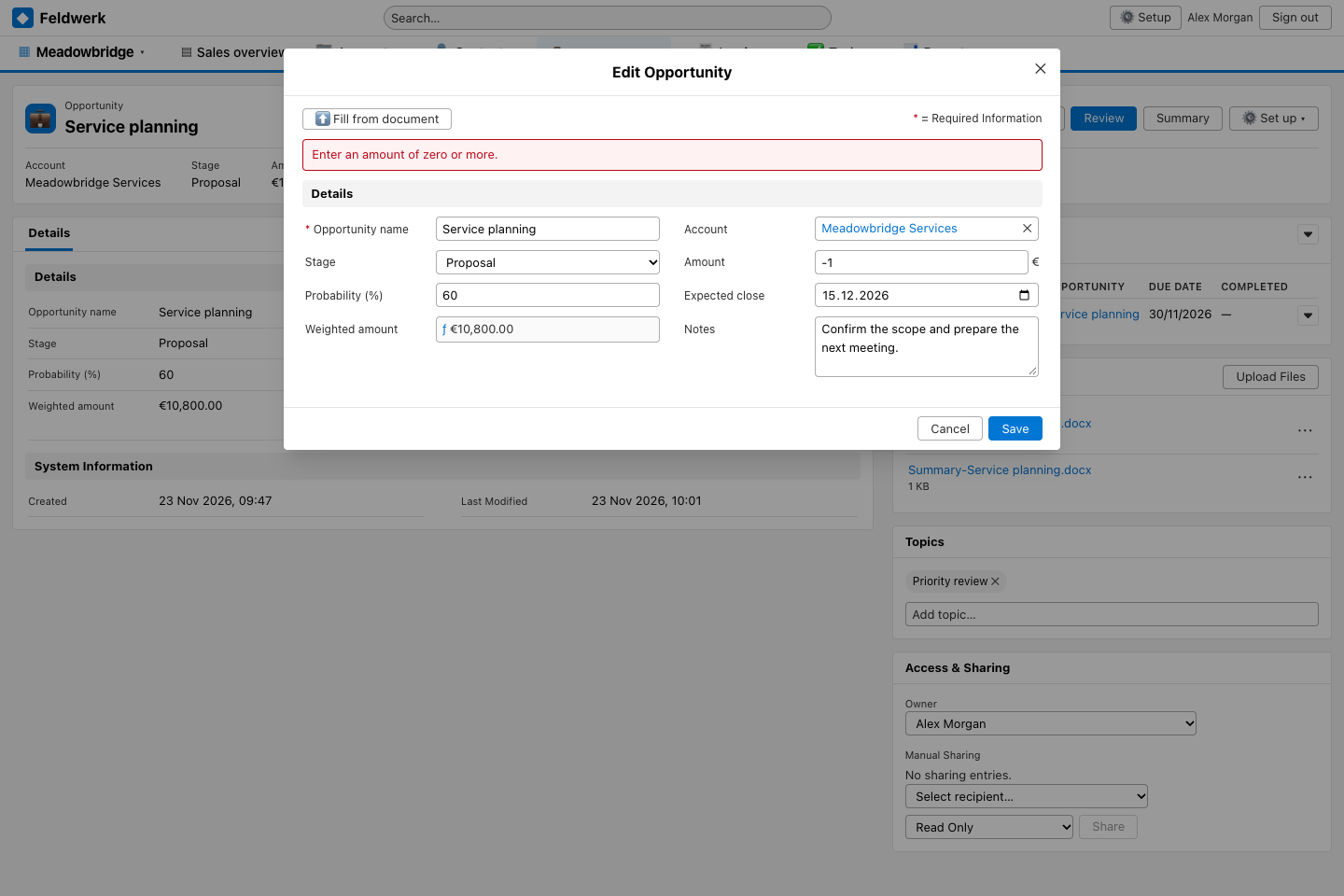
- Read the concrete correction message.
- Correct the input.
- Save and verify the result.
Select the screenshot to open the full-size image.
In the example, Amount -1 is rejected with “Enter an amount of zero or more.” Correcting it to 18000 allows the save. The attempted invalid value is not the saved value.
Missing records or fields
Clear the list search and inspect filters, owner scope and relationship scope. Try the global search with at least two characters. Check field-level access and record visibility. Document contents are not automatically searchable merely because a file was uploaded; extraction into a searchable record field must be configured.
Unexpected calculations
Check the field API names, return type and blank handling of a formula. For roll-ups, inspect the child lookup, selected value field and filters. For a report, distinguish a limited preview from a full run and check grouping and aggregation. Do not manually overwrite a calculated field to conceal incorrect inputs.
Files and documents
For upload failures, check the per-file size limit and the result for each selected file. Some files may have succeeded even when another failed. Verify the target record and panel source.
For generated documents, check the template’s source object, tokens and prerequisite. PDF conversion also requires the configured server converter. A successful download and successful attachment storage are separate outcomes; inspect the result message.
Automation did not run or changed nothing
Check the active version, trigger event and entry conditions. Flow conditions use the current record context, for example $Datensatz.feld. Inspect the execution for that version and compare its path with the expected branch.
If an Update Records step produces no change, verify the target record resource and field mapping. For scheduled flows, check scheduler operation, timezone, schedule and record filters. For screen flows, test with the actual user’s permissions. After-save failures do not necessarily undo the original saved record.
An email did not arrive
First distinguish draft, queued, delayed, failed and sent states in the available email and Outbox views. Check recipient, configured sender connection, scheduled sending window and the latest error. A queued message is not proof of delivery. Avoid repeatedly queuing the same message while diagnosing a transport problem.
AI is unavailable or gives an unexpected result
Check whether an active model is configured for the required capability and whether its provider connection is valid. Review the selected model, supplied context and tool result. A generated answer should be checked against the underlying record or document. Do not paste provider keys into support messages or screenshots.
Contact synchronisation problems
Check the configured direction, object mapping, connection and latest sync status. Confirm which side owns each value before retrying a write. If a remote service fails, preserve the reported error and identify a single affected example rather than making broad changes to all contacts.