

Choose a formula rather than a copied value
A Formula field derives its value when the record is read. It is read-only in ordinary forms. Use it when the result should follow its inputs; use a default or automation when a value must instead be assigned or stored at a particular event.
The handbook’s Weighted amount field uses wert * wahrscheinlichkeit / 100. Here wert is Amount and wahrscheinlichkeit is the Number field labelled Probability (%). With 18000 and 60, the result is 10800. Changing probability to 50 changes the calculated result to 9000.
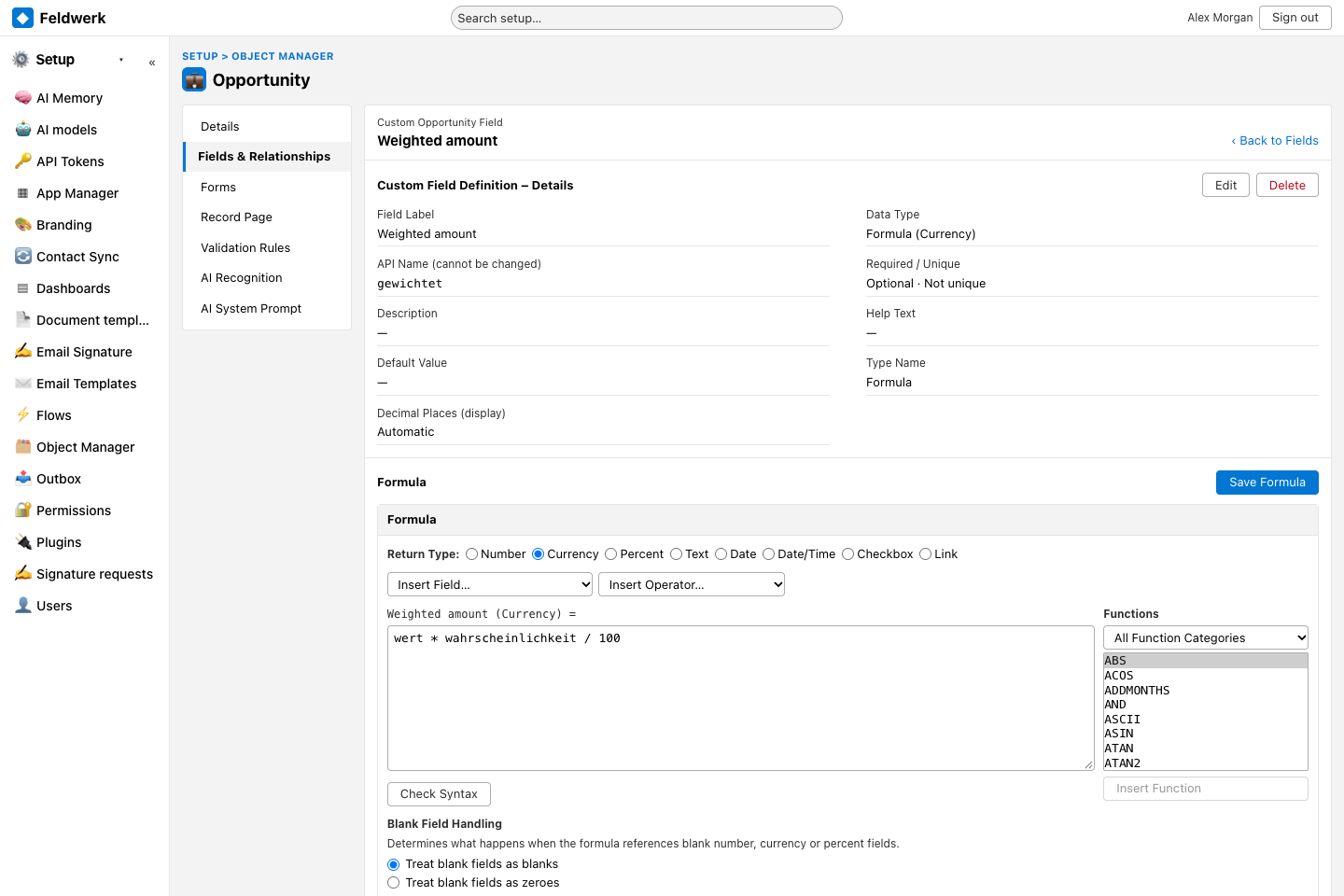
- Choose the result type.
- Use stable field API names in the expression.
- Check syntax before saving.
- Decide how blank numeric inputs behave.
Select the screenshot to open the full-size image.
Create and validate a formula
- Open the object’s Fields & Relationships and create a Formula field.
- Choose the Return Type: Number, Currency, Percent, Text, Date, Date/Time, Checkbox or Link.
- Enter the expression, using Insert Field, Insert Operator and the Functions list where helpful.
- Choose how blank numeric fields are treated.
- Select Check Syntax, correct any errors and select Save in the new-field wizard. For an existing field, use Save Formula.
- Inspect records with ordinary, blank and boundary values.
A successful syntax check does not prove the business calculation is right. Check known inputs and independently calculate the expected result. Review the declared return type and display decimals. The syntax check reports the expression’s inferred result family: adding two Currency inputs can report Number while the field’s declared Return Type remains Currency. The declared type controls the field output.
Expression basics
Use field API names rather than labels. Supported arithmetic includes +, -, *, / and ^; parentheses control grouping. Use & to concatenate text. Comparisons include =, <>, <, >, <= and >=. Text literals use quotes, and function arguments are separated by commas.
Related values can be accessed through supported lookup paths such as konto.name. Formula field expressions use this field context. Flow expressions have their own context, including $Datensatz; copy expressions only after checking the context.
Blank values and invalid calculations
Blank Field Handling determines whether blank Number, Currency and Percent inputs remain blank or are treated as zero. Use ISBLANK, BLANKVALUE or a conditional expression when the business meaning needs an explicit fallback.
Division by zero returns a blank result. A missing lookup is another reason a derived value can be blank. Avoid hiding these cases behind an arbitrary zero unless zero is the correct business meaning. References to other calculations must not create cycles.
For a concrete blank-value check, create Currency inputs betrag and zuschlag, then a Currency formula betrag + zuschlag. With Amount 100 and Surcharge blank, Treat blank fields as zeroes gives 100; Treat blank fields as blanks gives a blank result. Setting Surcharge to 25 produces 125. Trying to assign the formula result directly through the API is rejected.
Insert Field adds a field’s API name at the cursor. Insert Operator adds the selected symbol. Choose a function category, select a function and click Insert Function to insert its name and empty parentheses; fill in its arguments before checking syntax. Lookup paths can be typed manually. A successful local syntax check still needs the server’s final path and cycle validation when saving.
Executed examples
These examples were run through the same formula engine used by Feldwerk.
| Expression | Result |
|---|---|
ROUND(18.456, 2) | 18.46 |
IF(2 > 1, "Ready", "Waiting") | Ready |
UPPER("Meadowbridge") | MEADOWBRIDGE |
FIXED(2400, 2) | 2400.00 |
FORMATNUMBERDE(2400, 2) | 2.400,00 |
DATE(2026, 12, 15) | 2026-12-15 |
YEAR(DATE(2026, 12, 15)) | 2026 |
Choose functions by purpose
- Logic: IF and CASE choose values; AND, OR and NOT combine conditions. ISPICKVAL compares the stored picklist value.
- Numbers: ROUND and TRUNC control decimals; MIN and MAX select extremes. CEILING/FLOOR and MCEILING/MFLOOR differ for negative values: CEILING(-3.2) is -4, while MCEILING(-3.2) is -3.
- Text: LEFT, RIGHT, MID and FIND work with portions and positions. FIND is case-sensitive and returns a one-based position, or zero when not found. REGEXEXTRACT returns the first matching text or group; an invalid pattern or no match returns empty text. REGEXTEST returns false for an invalid pattern.
- Formatting: FIXED produces fixed decimals with a dot and no thousands separator. FORMATNUMBERDE produces German number formatting. These function names are stable language-independent identifiers.
- Dates: TODAY and NOW use the engine’s current time. YEAR, MONTH and DAY extract date components; ADDMONTHS moves by calendar months and clamps an overflowing day to the last day of the target month. DATETIMEVALUE interprets text without a timezone as UTC. LOCALTEXT formats date/time in Europe/Berlin.
- Links and encoding: HYPERLINK returns a Link value. RECORDURL produces a record URL from a lookup. URLENCODE and XMLENCODE encode values for the corresponding output context.
- Attachments: ATTACHMENTCOUNT returns the current record’s attachment count; HASATTACHMENTS indicates whether it has any.
Compatibility limitations
IMAGE returns its alternative text rather than embedding an image. CASESAFEID returns the input text without converting an ID. HYPERLINK accepts an optional target argument but ignores it. TIMENOW currently returns a Date/Time value. FORMATDURATION formats an absolute whole-second duration as hours:minutes:seconds; its optional second argument is not used.
CURRENCYRATE, DISTANCE, GEOLOCATION, GETSESSIONID and PICKLISTCOUNT are available. Currency rates require a current provider snapshot; the session identifier requires an authenticated browser session. See the individual function pages for examples and limits.
Available functions: syntax and examples
Select a function to read what each argument means, which arguments are optional and what the example returns. New formulas always use English function names, including in the German interface. Existing German names remain valid as compatibility aliases. Field API names and text values are unchanged. The complete reference is also included in the PDF.
Numbers and mathematics
| Function and syntax | Purpose |
|---|---|
ABS(number) | Return the magnitude of a number without its sign. |
ACOS(number) | Return the inverse cosine, as an angle in radians. |
ASIN(number) | Return the inverse sine, as an angle in radians. |
ATAN(number) | Return the inverse tangent, as an angle in radians. |
ATAN2(y, x) | Return the angle of a two-dimensional vector in radians. |
CEILING(number) | Round a number away from zero to an integer. |
COS(angle) | Return the cosine of an angle. |
DISTANCE(location1, location2, unit) | Calculate the great-circle distance between two coordinate pairs. |
EXP(number) | Raise the mathematical constant e to the supplied power. |
FLOOR(number) | Round a number towards zero to an integer. |
GEOLOCATION(latitude, longitude) | Build a coordinate pair for a DISTANCE calculation. |
LN(number) | Return the natural logarithm (base e). |
LOG(number) | Return the base-10 logarithm. |
MAX(number1, number2, ...) | Return the largest supplied numeric value. |
MCEILING(number) | Round up towards positive infinity. |
MFLOOR(number) | Round down towards negative infinity. |
MIN(number1, number2, ...) | Return the smallest supplied numeric value. |
MOD(dividend, divisor) | Return the remainder after division. |
PI() | Return the mathematical constant pi. |
PICKLISTCOUNT(selection) | Count the selected values in a multi-select picklist. |
ROUND(number, decimal_places) | Round a number to the specified number of decimal places. |
SIN(angle) | Return the sine of an angle. |
SQRT(number) | Return the non-negative square root. |
TAN(angle) | Return the tangent of an angle. |
TRUNC(number [, decimal_places]) | Discard decimal digits without rounding. |
Logic and conditions
| Function and syntax | Purpose |
|---|---|
AND(condition1, condition2, ...) | Return true only if every condition is true. |
BLANKVALUE(value, fallback) | Replace a missing value or empty string with a fallback. |
CASE(value, match1, result1, match2, result2, ..., fallback) | Compare one value with alternatives and return the first matching result. |
IF(condition, value_if_true, value_if_false) | Choose between two values according to a condition. |
ISBLANK(value) | Test whether a value is missing or an empty string. |
ISNULL(value) | Test whether a value is missing or an empty string. |
ISNUMBER(value) | Test whether a value is numeric or can be parsed as a number. |
ISPICKVAL(picklist, stored_value) | Compare a single-choice picklist with a stored API value. |
NOT(condition) | Invert a Boolean condition. |
NULLVALUE(value, fallback) | Replace a missing value or empty string with a fallback. |
OR(condition1, condition2, ...) | Return true if at least one condition is true. |
Text and links
| Function and syntax | Purpose |
|---|---|
ASCII(text) | Return the UTF-16 code unit of the first character. |
BEGINS(text, prefix) | Test whether text starts with a prefix. |
BR() | Insert a newline into text. |
CHR(code) | Create one UTF-16 character from a numeric code. |
CONTAINS(text, search_text) | Test whether text contains a substring. |
FIND(search_text, text [, start]) | Find the first position of a substring. |
FIXED(number [, decimal_places]) | Format a number as fixed-decimal text with a decimal point and no grouping. |
FORMATNUMBERDE(number [, decimal_places]) | Format a number as German numeric text with grouped thousands and a decimal comma. |
HYPERLINK(url, label [, target]) | Create a link value with a destination and display text. |
IMAGE(url, alternative_text [, height, width]) | Return an image’s alternative text; this implementation does not render an image. |
INCLUDES(choices, stored_value) | Test for an exact member of a multi-select value. |
INITCAP(text) | Lowercase the text and capitalise word starts. |
LEFT(text, count) | Take characters from the beginning of text. |
LEN(text) | Count the characters in text. |
LOWER(text) | Convert text to lower case. |
LPAD(text, length [, padding]) | Pad text on the left to reach a target length. |
MID(text, start, count) | Take characters from a position within text. |
RECORDURL(lookup) | Return the relative Feldwerk URL of a referenced record. |
REGEXEXTRACT(text, pattern [, group]) | Extract the first regular-expression match or a capture group. |
REGEXTEST(text, pattern) | Test whether a regular expression matches any part of the text. |
REVERSE(text) | Reverse the order of text characters. |
RIGHT(text, count) | Take characters from the end of text. |
RPAD(text, length [, padding]) | Pad text on the right to reach a target length. |
SUBSTITUTE(text, old_text, new_text) | Replace every occurrence of a substring. |
TEXT(value) | Convert a value to text. |
TRIM(text) | Remove whitespace from both ends of text. |
UPPER(text) | Convert text to upper case. |
URLENCODE(text) | Encode a single URL component. |
VALUE(text) | Parse numeric text into a number. |
XMLENCODE(text) | Escape XML-sensitive characters in a text value. |
Dates and times
| Function and syntax | Purpose |
|---|---|
ADDMONTHS(date_or_datetime, months) | Move a date by a number of calendar months. |
DATE(year, month, day) | Construct a date from three numbers. |
DATETIMEVALUE(value) | Parse a timestamp or convert a typed date to a date/time. |
DATEVALUE(value) | Convert an ISO date string or typed date/time into a date. |
DAY(date_or_datetime) | Extract the day of month from a date. |
DAYOFYEAR(date_or_datetime) | Extract the day number within the year (1–366) from a date. |
FORMATDURATION(seconds [, compatibility_option]) | Format an elapsed duration as hours:minutes:seconds. |
FROMUNIXTIME(seconds) | Convert Unix epoch seconds to a date/time. |
HOUR(date_or_datetime) | Extract the hour (0–23) from a date. |
ISOWEEK(date_or_datetime) | Extract the ISO week number from a date. |
ISOYEAR(date_or_datetime) | Extract the ISO week-numbering year from a date. |
LOCALTEXT(date_or_datetime) | Format a date/time as text in Europe/Berlin local time. |
MILLISECOND(date_or_datetime) | Extract the millisecond (0–999) from a date. |
MINUTE(date_or_datetime) | Extract the minute (0–59) from a date. |
MONTH(date_or_datetime) | Extract the month (1–12) from a date. |
NOW() | Return the current date and time. |
SECOND(date_or_datetime) | Extract the second (0–59) from a date. |
TIMENOW() | Return the current date and time, like NOW in this implementation. |
TIMEVALUE(date_or_datetime) | Return a typed date/time value from an existing typed date or date/time. |
TODAY() | Return today’s date in UTC. |
UNIXTIMESTAMP(date_or_datetime) | Convert a date/time to whole seconds since the Unix epoch. |
WEEKDAY(date_or_datetime) | Extract the weekday (1 = Sunday, 7 = Saturday) from a date. |
YEAR(date_or_datetime) | Extract the year from a date. |
Record context and compatibility
| Function and syntax | Purpose |
|---|---|
ATTACHMENTCOUNT() | Return the current record’s attachment count. |
CASESAFEID(value) | Return the input as text without converting the identifier. |
CURRENCYRATE(currency_code) | Return units of the corporate currency per one unit of the requested currency. |
GETSESSIONID() | Return the public identifier of the current authenticated browser session. |
HASATTACHMENTS() | Test whether the current record has at least one attachment. |
Context-dependent functions
All functions in this catalog are implemented. GETSESSIONID requires an authenticated browser session. CURRENCYRATE requires an available, current rate from the configured provider. Their detail pages explain the empty or null results when context is absent.