

These terms describe Feldwerk’s configurable workspace. Example object names are illustrative; your organisation may choose different names.
Object
A type of information your organisation stores, such as a contact or an invoice. Objects define the fields available on their records.
Read Objects and fields for the steps and examples.
Record
One item within an object: for example, one contact. Its record page shows its values and the related information configured for that page.
Read Work on a record page for the steps and examples.
Field
A named value on a record, such as an email address, due date or status. Its field type controls what you can enter. Required fields must have a value before you can save.
Read Objects and fields for the steps and examples.
API name
The stable technical name of an object or field. A label is the name shown to people; an API name is used by integrations and configuration. Changing a label does not rename the API name.
Read Objects and fields for the steps and examples.
List view
A saved way to display records, with columns, sorting and filters. Several views can show the same underlying records. A Kanban view groups cards into columns based on a picklist field.
Read Records and list views for the steps and examples.
Lookup
A field that links a record to another record. For example, a contact can refer to an account. Select the intended record rather than relying on a name alone when several records share that name.
Read Lookups and related lists for the steps and examples.
Related list
Records linked to the current record through a relationship. For example, an account page can show contacts that refer to that account. Which lists appear depends on the page configuration and access rights.
Read Lookups and related lists for the steps and examples.
Form
An arrangement of fields and sections used to enter or edit information. A public web form lets people submit information without signing in; its available fields and checks differ from an internal form.
Read Form builder for the steps and examples.
Record page
The page for one record. It can combine details, related lists, a timeline, attachments, topics and actions. Administrators choose its layout.
Read Work on a record page for the steps and examples.
Formula field
A read-only value calculated from an expression when records are read. Change its inputs or its configuration to change the result.
Read Formula fields for the steps and examples.
Roll-up field
A read-only summary of related child records, such as their count or a sum. The administrator chooses the relationship, calculation and any filter.
Read Roll-up and auto-number fields for the steps and examples.
Auto-number field
A number assigned by the system when a record is created, using a configured format. It is not a value you type into the form.
Read Roll-up and auto-number fields for the steps and examples.
Validation rule
A rule that can reject a save and explain what needs correcting. Administrators define the condition and message; users correct the record before trying again.
Read Validation rules for the steps and examples.
Flow
Configured automation made of steps and decisions. Depending on its trigger, it can react to a saved record or uploaded attachment, run on a schedule, or guide a user through screens. Its allowed steps depend on the trigger.
See Flows and automation for the steps and examples.
Action
A command available in a record page or list, such as editing a record, starting a screen flow or producing a document. Available actions depend on configuration and permissions.
See Record pages and actions for the steps and examples.
Report
An analysis of records using selected fields, filters, grouping and calculations. A dashboard combines configured widgets, such as reports and record lists, on one page.
Read Reports for the steps and examples.
App
A configured workspace with navigation tabs. Switching apps changes your navigation context; it does not create another user account.
See Apps and branding for the steps and examples.
Permissions and sharing
Permissions determine which operations and fields you can use. Sharing determines access to individual records. Seeing a record does not automatically give permission to edit or delete it.
See Users, permissions and sharing for the steps and examples.
Attachment
A file stored with a record. Access to it is checked through the record. Attaching a PDF does not by itself make its full text available in global record search.
Read Attachments and topics for the steps and examples.
Topic
A tag attached to a record to describe or categorise it. Topics complement your fields; they do not replace the object’s structure.
Read Attachments and topics for the steps and examples.
API token
A credential used by an integration to act as its owner. Keep it private and revoke it when it is no longer needed. Its access follows the owner’s permissions.
See API tokens and MCP for the steps and examples.
MCP
Model Context Protocol: a way for a compatible assistant to discover and call Feldwerk tools. These tools use the same permission-checked application operations as other supported access paths.
See API tokens and MCP for the steps and examples.
Dashboard
A page that combines reports, lists, screen flows and text without a single current record. Add it to an app as a tab. See Dashboards.
Start working
Follow Getting started to sign in and find your first record.
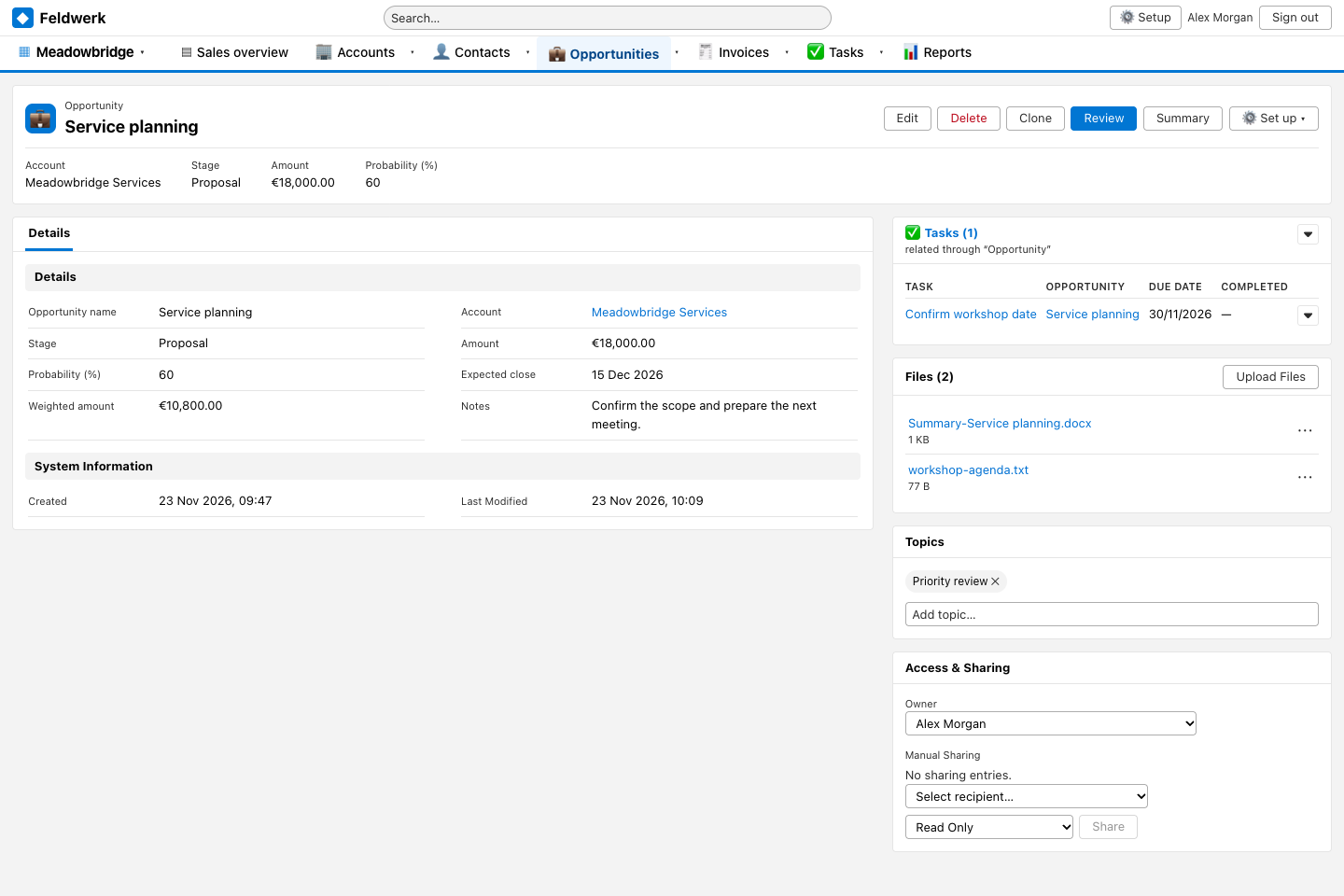
- Fields hold the values of this record.
- The Account lookup links to another record.
- A related list shows records linked to this opportunity.
Select the screenshot to open the full-size image.